LLMs have been trained on vast amounts of shell sessions and codebases. That’s why agents are naturally good at using CLIs and navigating filesystems.
A recent blog post describing how LangSmith Agent Builder’s memory system is built on a filesystem kicked off a discussion about whether “filesystems are all you need”. Harrison Chase, LangChain’s CEO and the blog’s author, later clarified that they actually don’t store the data in a real filesystem but in a database and only expose it to the agent in the shape of a filesystem. A few weeks later, Mintlify described how they built a virtual filesystem on top of their existing database to enable an agent to run cat, ls, grep, and find via the just-bash library.
Inspired by these blogs, I explore how you can implement a virtual filesystem over Elasticsearch. This is intended as a proof-of-concept implementation and aims to stay as close as possible to the architecture described in the Mintlify blog. You can find the resulting implementation of ElasticsearchFs at iamleonie/elasticsearch-fs.
What is a “virtual filesystem” for agents
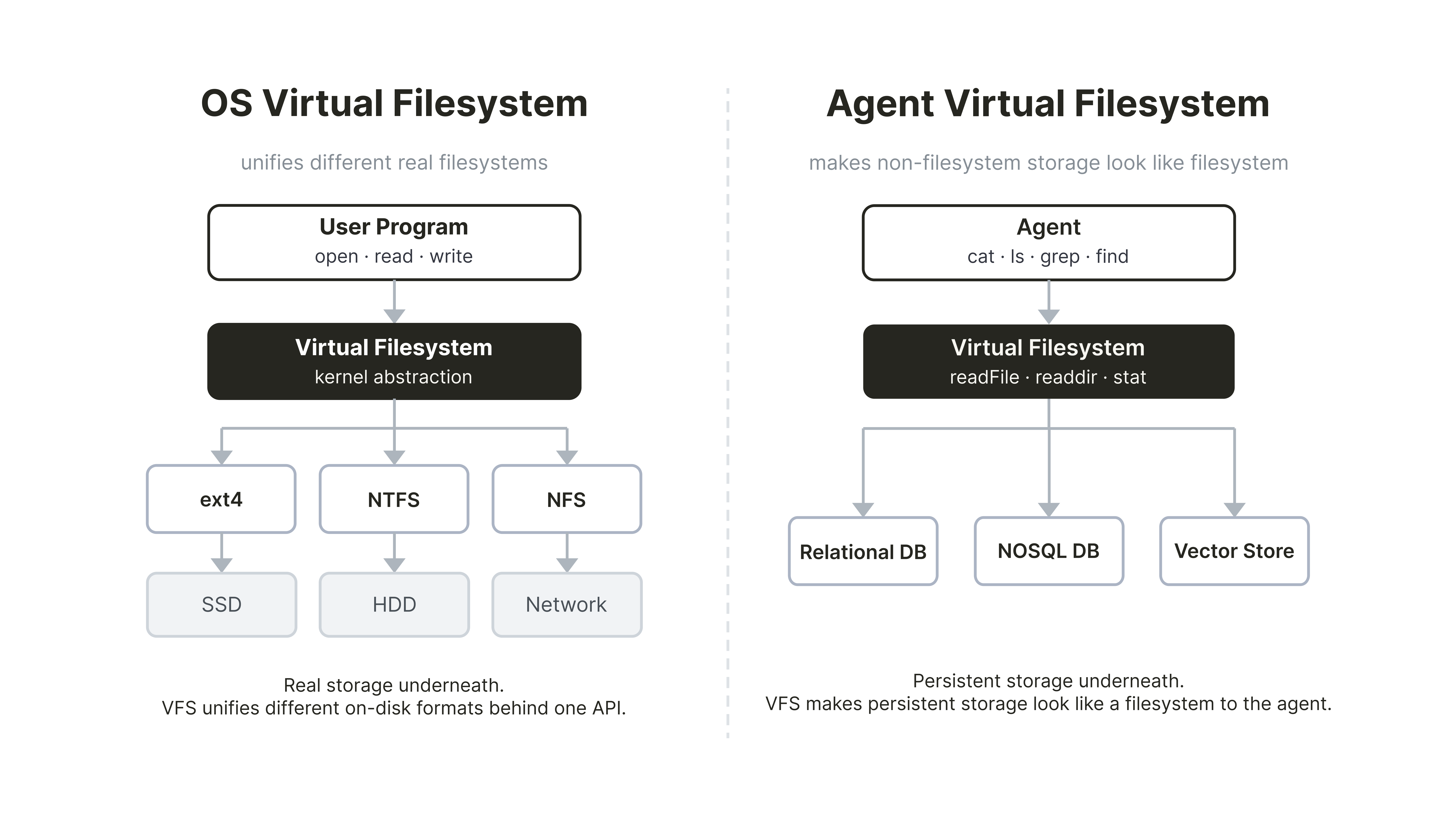
The term “virtual filesystem” is traditionally used in the context of operating systems. There, a virtual filesystem is the layer that lets every program use the same open, read, and write calls whether it’s reading from an SSD, a USB stick, or a network share.
In the context of AI agents, a virtual filesystem describes a filesystem-shaped interface on top of persistent storage, such as a relational database, a vector store, or, as in this case, Elasticsearch. This lets the agent use ls, cat, find, and grep over the stored data. The agent running, for example, grep -r "access_token" /docs is searching a filesystem and doesn’t know it’s interacting with a search index. Thus, commands like grep become an interface, the implementation of which can make use of powerful search features, such as vector search or hybrid search.
Architecture Overview
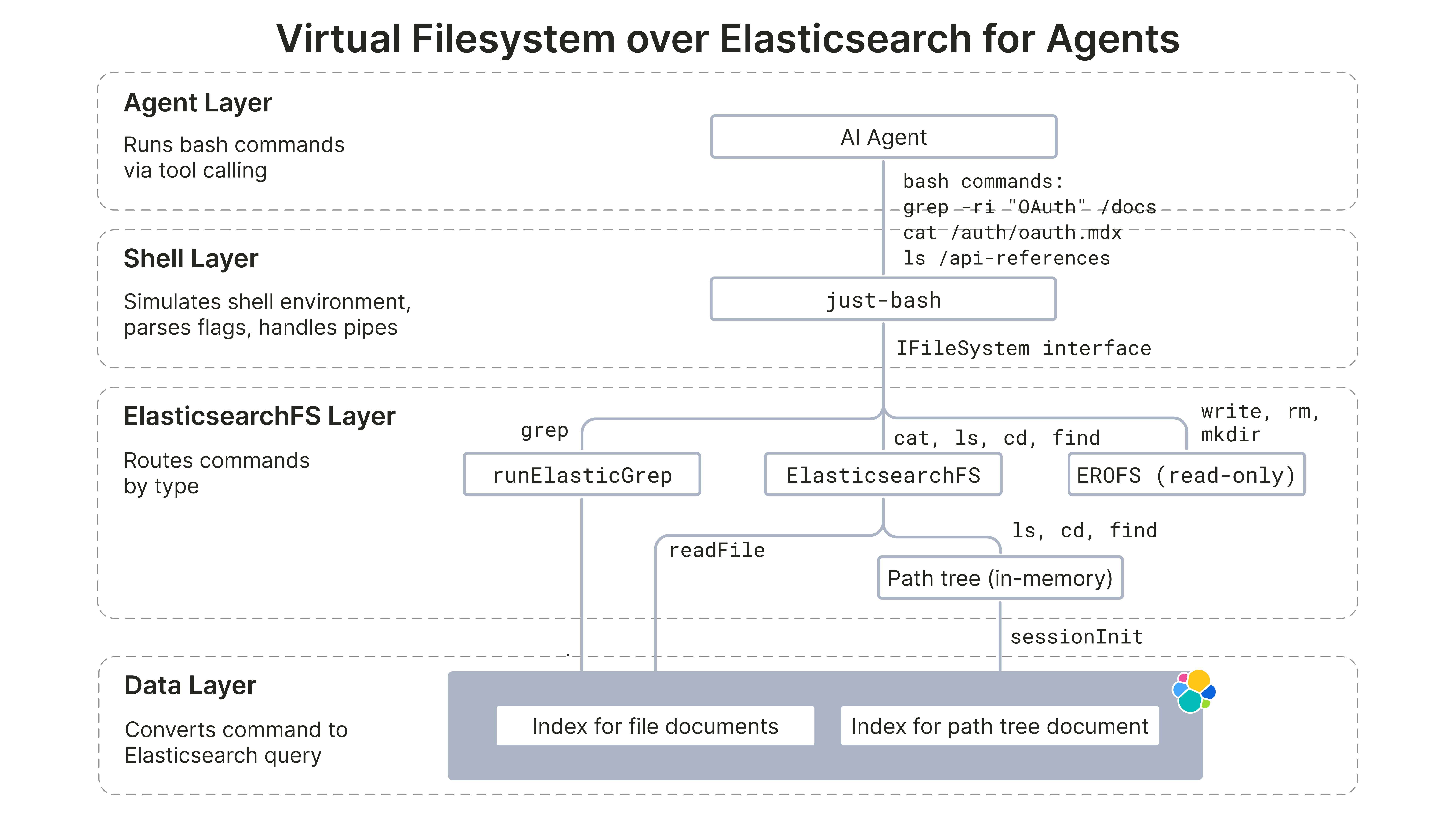
The resulting implementation of the ElasticsearchFs virtual filesystem has four layers, similar to the Mintlify blog:
- Agent layer: The LLM agent runs shell commands via tool calls.
- Shell layer:
just-bashis a TypeScript library that intercepts those shell command strings, parses flags, handles pipes, and dispatches to aIFileSysteminterface.
ElasticsearchFslayer: Implements theIFileSysteminterface against the underlying data layer.- Data layer: Data is stored in an Elasticsearch Serverless cluster.
In addition to the implementation described in the Mintlify blog, we also consider the following design guidelines for virtual filesystems described in the LangChain documentation:
- Absolute path handling and normalization. Paths are always absolute.
normalizePathensures any path the agent passes is canonicalized before any tree lookup or Elasticsearch call (e.g.,auth/oauthbecomes/auth/oauth).
- Implement
lsandglobefficiently (server-side filtering where available, otherwise local filter). Both operations run in-memory after session boot without any Elasticsearch calls. - Handle errors explicitly: LangChain’s guideline recommends structured result types with an error field for missing files or invalid patterns. Since our implementation builds on top of
just-bash, we use POSIX-styleErrnoExceptionerrors (ENOENT,ENOTDIR,EROFS). Additionally, we follow Mintlify’s read-only design and thus every write operation throwsEROFS.
Implementation details
The implementation splits into four areas: access control, filesystem navigation, file reading, and file search. You can find the full implementation in the elasticsearch-fs repository.
Access control via DLS
ElasticsearchFs delegates file access control to Elasticsearch Document Level Security (DLS): Each query gets attached to an Elasticsearch role, and every request made under that role is automatically filtered by that query at search time. This reduces the chance of accidental data leaks because access checks are enforced in the data layer for every query path.
For this POC implementation, we follow the example path tree policy shape from the Mintlify blog with three roles: PUBLIC, BILLING, and INTERNAL. Additionally, we have a fourth role SYSTEM for ingestion.
| Path | PUBLIC | INTERNAL | BILLING | SYSTEM |
|---|---|---|---|---|
| /auth/oauth.mdx | x | x | x | x |
| /auth/api-keys.mdx | x | x | x | x |
| /internal/billing.mdx | - | x | x | x |
| /internal/audit-log.mdx | - | x | - | x |
| /api-reference/users.mdx | x | x | x | x |
| /api-reference/payments.mdx | - | - | x | x |
| /api-reference/search-use-case/* | x | x | x | x |
The roles are created and attached to an API key in the Serverless project by setting privileges as follows:
{
  "PUBLIC": {
    "cluster": [],
    "indices": [
      {
        "names": ["elasticsearchfs-chunks"],
        "privileges": ["read"],
        "query": {
          "bool": {
            "should": [
              { "prefix": { "slug": "auth/" } },
              { "prefix": { "slug": "api-reference/search-use-case/" } },
              { "term": { "slug": "api-reference/users" } }
            ],
            "minimum_should_match": 1
          }
        }
      },
      {
        "names": ["elasticsearchfs-meta"],
        "privileges": ["read"]
      }
    ]
  }
}cat: Reading files
Reading files is a single Elasticsearch call. When the agent runs cat /auth/oauth.mdx, just-bash calls readFile, which resolves the path to the slug auth/oauth and queries Elasticsearch for that slug:
async readFile(path: string): Promise<string> {
  const slug = this.resolveReadFileSlug(path);

  const results = await this.client.search<FileHitSource>({
    index: ELASTICSEARCHFS_FILES_INDEX,
    size: 1,
    _source: ['content'],
    query: {
      bool: {
        filter: [{ term: { slug } }],
      },
    },
  });

  const hit = results.hits.hits[0];
  const content = hit?._source?.content;
  if (content === undefined) {
    throw enoent();
  }

  return content;
}
Additionally, resolveReadFileSlug rejects directory paths with ENOTDIR and unknown paths with ENOENT before any network call.
grep: The two-stage optimization
Similar to Mintlify, we implement a two-stage optimization for the grep implementation because a naive grep -r would read every in-scope file over the network. However, just-bash’s defineCommand hook lets us register a custom grep, which allows us to implement a two-stage grep optimization. The custom grep receives raw argv tokens, which we parse with yargs-parser.
The first stage (coarse filtering) narrows the candidate set first by running a search query over the database. Depending on the pattern shape, it chooses a query type for literal patterns or regex patterns.
Literal patterns (-F / --fixed-strings, or no regex metacharacters) are split into two coarse-query shapes. First, ignore-case literals (-i) use match_phrase on content:
{
  "query": {
    "bool": {
      "filter": [{ "terms": { "slug": ["<slugs-in-scope>"] } }],
      "must": [{ "match_phrase": { "content": "<literal-pattern>" } }]
    }
  }
}
On the other hand, case-sensitive literals use regexp on content.pattern with an escaped literal:
{
  "query": {
    "bool": {
      "filter": [{ "terms": { "slug": ["<slugs-in-scope>"] } }],
      "must": [
        {
          "regexp": {
            "content.pattern": {
              "value": ".*(<escaped-literal-pattern>).*",
              "case_insensitive": false
            }
          }
        }
      ]
    }
  }
}
Regex patterns use regexp on content.pattern, which is a wildcard multi-field. Note that running regexp on the content field is possible as well but only allows term-level matching.
{
  "query": {
    "bool": {
      "filter": [{ "terms": { "slug": ["<slugs-in-scope>"] } }],
      "must": [
        {
          "regexp": {
            "content.pattern": {
              "value": ".*(<regex-pattern>).*"
            }
          }
        }
      ]
    }
  }
}
In the second stage (fine-filter), each candidate slug is read via readFile. The content is split on line boundaries and each line is tested against a compiled RegExp (or a plain includes check for fixed-string patterns).
  // Coarse Filter: Ask backing store for slugs matching the string/regex
  const matchedSlugs = await elasticsearchFs.findMatchingFiles(
      coarseFilter,
      slugsUnderDirs,
    );

  if (matchedSlugs.length === 0) return { stdout: '', stderr: '', exitCode: 1 };

  // Fine Filter: Narrow to resolved hit paths.
  const matchedPaths = matchedSlugs.map((slug) => slugToPath(slug));

  // Exec: Let the in-memory RegExp engine format the final output
  return execBuiltin(
    scannedArgs,
    matchedPaths,
    elasticsearchFs,
    shouldPrefixFilePath,
  );
Known Limitations
This implementation is a POC and has the following known limitations:
- Coarse grep can produce false negatives The coarse stage uses Elasticsearch/Lucene regexp syntax while the fine stage uses JavaScript
RegExp. This mismatch can produce false negatives before validation.
- No bulk-prefetch. Mintlify’s grep coarse stage identifies candidate files in the data store, then bulk-fetches all matching chunks into a cache before the fine-filter pass, so large recursive queries complete in milliseconds.
ElasticsearchFsreads each candidate file individually viareadFile, with no in-process cache.
statreturns placeholder metadata.sizeis always0andmtimeis always epoch —statmakes no Elasticsearch call. Session boot loads only path-tree metadata (and not per-file timestamps/sizes); althoughupdated_atexists on documents, this implementation does not materialize it into the in-memory tree. The practical consequence:ls -l,find -mtime, andfind -sizeare not truthful.
.mdx-only file type. The path tree is keyed on/<slug>.mdxexclusively. Files with any other extension cannot be represented in the tree and are invisible to the agent.
Trying it out
You can use the virtual filesystem over Elasticsearch as follows:
import { ElasticsearchFs } from '../src/core/elasticsearchfs.js';
import { runElasticGrep } from '../src/core/grep.js';
import { Bash, defineCommand } from 'just-bash';
import { createESClient } from '../src/es-adapter/client.js';
import { initSessionTree } from '../src/session.js';

// 1. Initialize ES client with the user profile
const profile = "PUBLIC"
const client = createESClient(profile);

// 2. Initialize the path tree
const session_tree = await initSessionTree(client, profile);

// 3. Initialize the virtual filesystem
const elasticsearchFs = new ElasticsearchFs({
  client: client,
  files: session_tree.files,
  dirs: session_tree.dirs,
});

// 4. Define custom grep command
const grep = defineCommand('grep', async (args, ctx) =>
  runElasticGrep(args, ctx, elasticsearchFs),
);

// 5. Initialize Bash instance over Elasticsearch backend with custom grep command
const bash = new Bash({
  fs: elasticsearchFs,
  cwd: '/',
  customCommands: [grep],
});

// 6. Usage examples
await bash.exec('grep -ri "OAuth" /auth');
await bash.exec('cat /auth/oauth.mdx');
await bash.exec('ls /api-reference');
Summary
This blog implements ElasticsearchFs, a virtual filesystem over Elasticsearch. It is built on top of just-bash and exposes cat, ls, cd, find, and grep for an agent while keeping access control close to the data. This POC has not been benchmarked. The goal is to explore the architecture and implementation, not to validate latency or cost claims.
The code is available in the repository. For a more production-ready implementation, the next upgrades could be an in-process/remote cache for repeated file reads during grep-heavy sessions or a semantic search alternative to grep. Note that the latter would require additional chunking on the files and reassembly at query time.
References
- Mintlify. How we built a virtual filesystem for our assistant
- Vercel Labs.
just-bashGitHub repository
- LangChain. Design guidelines: Use a virtual filesystem